An AI policy template gives a healthcare business a starting point for deciding which tasks staff may carry out with artificial intelligence, what information they may enter and who checks the result. The real test is whether a colleague can use those instructions when a question arises during work.
This starting template covers a deliberately narrow administrative use: turning public, approved service information into a draft internal staff briefing. It does not authorise clinical work, patient communication or the use of personal information. Adapt the decisions with your responsible managers and relevant specialists before adopting a policy.
Start the AI policy template with a permitted task
“Use AI responsibly” leaves too much for an individual employee to interpret. Write a task that a supervisor can recognise. For example: “Prepare a draft staff briefing from the public opening-hours page that the practice manager has approved.” That is different from summarising a patient's history or deciding how to answer a complaint.
Record both the tool and the account arrangement approved for that task. A product name alone does not explain which settings, features or information-handling arrangements have been reviewed. The business should confirm those details with its supplier and responsible advisers. Staff should not have to infer approval from a colleague's use of a different account.
The UK Government AI Playbook, published on 10 February 2025, addresses responsible use, security, meaningful human control and assurance. It is written for government, rather than as a private-clinic policy. Those themes help frame a discussion; they do not establish that your chosen tool or task is approved.
A copyable AI policy template for discussion
Copy the following into your own working document. Replace each bracketed field, name the person who owns the decision and keep unresolved items visible. This is an original planning aid from Kay & Co., not a legal document or evidence of regulatory compliance.
| Policy section | Working wording to adapt |
|---|---|
| Purpose and owner | This policy covers [specific administrative task]. [Role] owns the policy, approves changes and answers staff questions. Version [number] takes effect on [date] after approval by [role]. |
| Approved tool and access | Staff may use [tool, account type and approved access route] for this task. The approval record is [location]. A new tool, account or connected feature requires review before use. |
| Permitted inputs | Use only [defined public, approved source material]. Do not enter patient details, staff information, confidential business information or copied correspondence under this policy. Ask [role] if the material is uncertain. |
| Permitted output | The tool may create [draft format] for internal review. It must not send, publish or change a record automatically. This permission excludes clinical advice, diagnosis, triage and decisions about individuals. |
| Human review | [Reviewer role] compares the entire draft with the approved source, corrects unsupported additions and approves the final text. If the source does not answer a question, leave it unresolved and ask its owner. |
| Problems and fallback | Stop the task and contact [reporting route] if inappropriate information is entered, the output is unreliable or the tool behaves unexpectedly. Follow the organisation's incident process. Use [manual alternative] while the task is paused. |
| Review and withdrawal | Review on [date], and earlier after a material change to the tool, task or information used. [Role] can suspend permission. Tell affected staff which version replaces the previous one and where the current instructions live. |
An AI acceptable use policy can sit alongside wider organisational rules, but its instructions must agree with them. Some fields will need more work than a name and date. In particular, the information boundary and incident route should agree with the organisation's existing arrangements. Keep the policy on hold while those decisions remain blank.
A fictional example: public opening hours, internal briefing
Fictional example: Alder Practice wants reception staff to receive a short briefing when public opening hours change. All details here are invented. The approved source says: “North reception closes at 5pm on Friday. The telephone line closes at 4.30pm. Saturday opening has not been confirmed.”
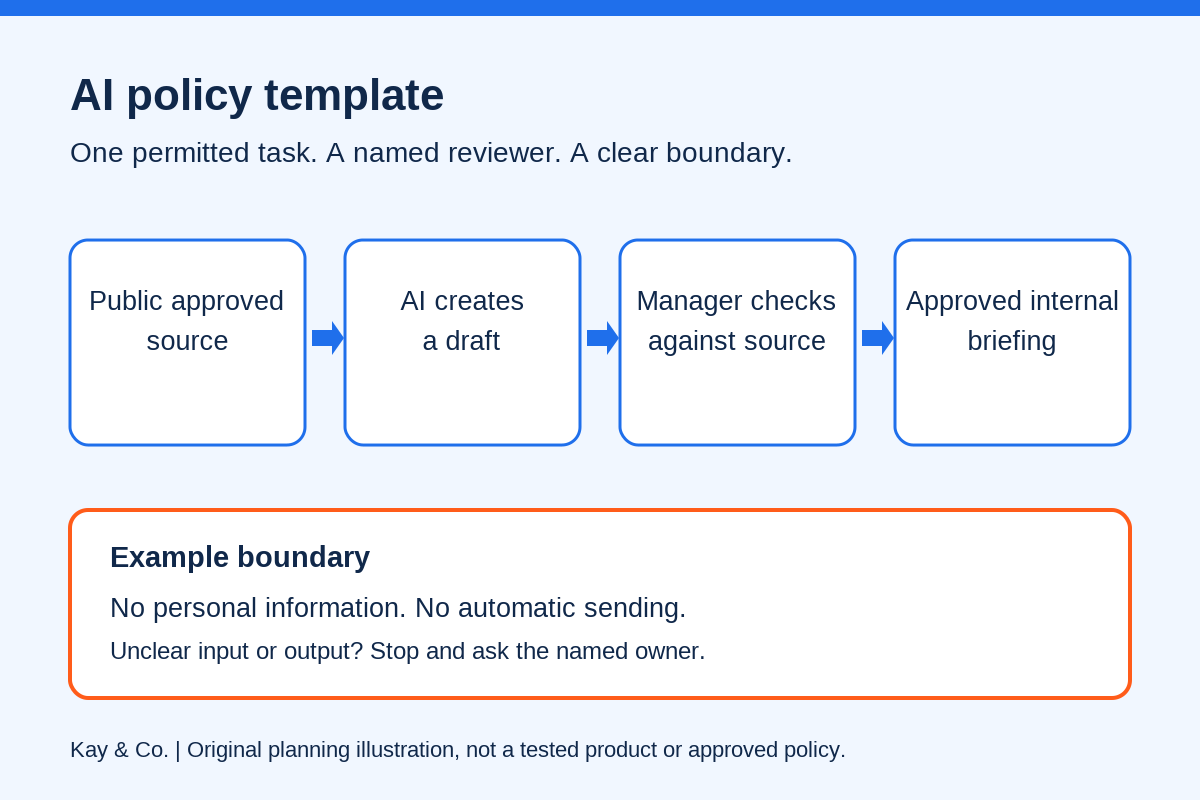
The practice manager permits an approved AI account to turn that public text into three internal bullet points. No patient, staff or confidential information is supplied. The output is a draft for the manager, not a message that the tool may send to visitors.
Suppose the draft says: “North reception and telephone line close at 5pm on Friday. The practice opens as normal on Saturday.” The reviewer makes two corrections: the telephone line closes at 4.30pm, and Saturday remains unconfirmed. The accepted briefing reads:
- North reception closes at 5pm on Friday.
- The telephone line closes at 4.30pm.
- Saturday opening is unconfirmed. Ask the practice manager before giving visitors an answer.
The review record can now identify the source, the two corrections, the approving role and the final version. This is a worked planning example, not evidence that an AI product passed a test or saved time. It also shows why “human review” needs an explicit comparison task, rather than a quick glance for spelling.
Keep the information boundary understandable
Staff need examples of what they may and may not enter. “Public opening-hours page” is clearer than “non-sensitive data”, especially when someone is working quickly. Copying a whole email thread to obtain one useful sentence can introduce information that the task never needed.
The ICO's AI and data protection guidance covers accountability, transparency, accuracy, security and other issues when AI involves personal information. The page currently warns that the guidance is under review following the Data (Use and Access) Act. Check current advice with the person responsible for data protection rather than treating this article as a complete statement of the law.
Our example avoids personal information to keep the first task bounded. That choice does not mean that all public information can be reused without checking rights or context, or that a different task using personal information is automatically prohibited or approved. It means that a different task needs its own assessment and authority.
Try the policy against three everyday questions
Before issuing the document, ask a colleague to use it to answer these situations. Record the expected decision and compare it with the answer the wording actually supports.
- A receptionist wants to paste a visitor's email into the tool. The permitted source is public approved material, so this task stops. The colleague uses the normal enquiry process and asks the named owner about any proposed change in scope.
- A new feature offers automatic publication. The policy allows reviewed drafts only. The feature remains outside permission until the responsible team has assessed and authorised a change.
- The approved page leaves Saturday hours unanswered. The reviewer preserves that uncertainty and asks the source owner. Plausible wording is not a substitute for a verified answer.
If colleagues reach different answers, improve the wording before rollout. This short exercise tests whether the instructions communicate the intended boundary. It does not replace technical, privacy, security or accessibility checks of the implementation.
Put the AI policy template into a workable routine
Keep one current version where staff can find it. Explain the permitted task, demonstrate the review step and name a contact for questions. Make the manual alternative clear so that stopping an uncertain AI task does not stop the underlying administrative work.
Review actual problems using appropriately limited records. Ask which instruction was unclear, which unsupported addition a reviewer caught and whether the fallback worked. Do not retain unnecessary personal information in examples or declare that a policy improved safety or productivity simply because staff completed training.
If you are still deciding whether a task belongs in an AI pilot, start with our workflow automation pilot guide. It helps define the work before a policy grants permission. Our digital project brief can then capture supplier responsibilities and acceptance checks. Neither document should silently expand the scope of the other.
Your next step is to take one real administrative task and complete the seven rows above with its owner. Leave any missing approval as a hold, not a tick. A useful AI policy template makes that decision visible and gives staff a dependable place to ask.